
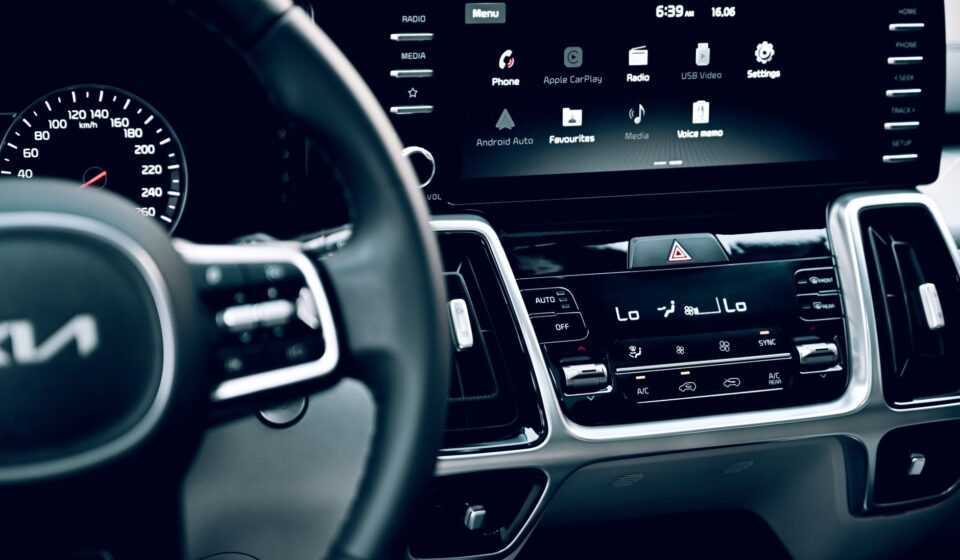

The driving experience has been revolutionized over the past decade, with technology becoming an integral part of our daily commute and long-haul journeys. Among these innovations, Apple CarPlay stands out as a game-changer, integrating your iPhone’s essential features directly into your car’s infotainment system. However, the requirement for a physical USB connection has always been a minor inconvenience for many. Enter the Wireless Apple CarPlay Adapter – a device that promises to untether you from cables, delivering a truly seamless and intuitive in-car experience.
This comprehensive guide will delve deep into what a Wireless Apple CarPlay Adapter is, why it matters, how it works, and everything you need to know to make an informed decision and enhance your driving pleasure globally. Whether you’re navigating bustling city streets or embarking on an microadventure road trip, going wireless can significantly uplift your journey.
The Dawn of Cord-Free Connectivity: What is a Wireless Apple CarPlay Adapter and Why It Matters
At its core, a Wireless Apple CarPlay Adapter is a small, plug-and-play device designed to convert your car’s existing wired CarPlay system into a wireless one. It essentially acts as a bridge, allowing your iPhone to connect to CarPlay via Wi-Fi and Bluetooth, eliminating the need for a USB cable. For years, the convenience of CarPlay has been tempered by the need to physically connect your iPhone every time you get into the car. This minor friction point often led to forgotten cables, tangled messes, or simply not bothering to connect for short trips.
Why does this matter? Because true convenience is often found in the absence of friction. Imagine getting into your car, starting the engine, and having your navigation, music, and communication apps instantly appear on your dashboard screen, without ever touching your phone. A Wireless Apple CarPlay Adapter offers precisely this level of effortless integration, making your car’s interior feel more modern and premium. It means fewer distractions, a cleaner console, and always-on access to your crucial iPhone features, whether you’re planning EV road trip planning tips or just heading to the grocery store.
The Problem it Solves
- Cable Clutter: Say goodbye to unsightly cables snaking across your dashboard or console.
- Instant Connection: CarPlay activates automatically as soon as you start your car, no plugging in required.
- Reduced Wear and Tear: Less frequent plugging and unplugging preserves your phone’s charging port and the car’s USB port.
- Enhanced Aesthetics: A cleaner, more streamlined vehicle interior.
- Convenience for Short Trips: No more skipping CarPlay for quick drives because it’s too much hassle to plug in.
Unpacking the Magic: How a Wireless Apple CarPlay Adapter Works
Understanding the technology behind a Wireless Apple CarPlay Adapter demystifies its operation. While it might seem like magic, it’s a clever application of existing wireless communication standards.
The Technical Symphony of Connectivity
When you plug a Wireless Apple CarPlay Adapter into your car’s USB port (the one traditionally used for wired CarPlay), it essentially emulates a wired iPhone connection to your car’s infotainment system. Concurrently, it sets up its own local Wi-Fi network and Bluetooth connection.
- Initial Bluetooth Pairing: The first step involves pairing your iPhone with the Wireless Apple CarPlay Adapter via Bluetooth. This initial handshake is crucial for discovery and establishing a communication channel.
- Wi-Fi Handover: Once the Bluetooth connection is established, the adapter instructs your iPhone to switch to a direct Wi-Fi connection with the adapter. Wi-Fi is preferred for data transfer because it offers significantly higher bandwidth than Bluetooth, which is essential for transmitting high-quality audio, video, and touch commands required by CarPlay.
- Data Relay: The adapter then relays all the CarPlay data (audio, video, touch input, Siri commands) between your iPhone and the car’s infotainment system over this Wi-Fi link. To the car, it still looks like a wired iPhone, but to your iPhone, it’s a seamless wireless connection.
This ingenious setup allows the Wireless Apple CarPlay Adapter to deliver the full CarPlay experience without any noticeable lag or reduction in quality, making it an indispensable accessory for modern drivers globally.
Benefits Beyond the Cable: Why You Need a Wireless Apple CarPlay Adapter
The advantages of integrating a Wireless Apple CarPlay Adapter into your vehicle extend far beyond simply cutting the cord. They touch upon safety, convenience, and overall driving enjoyment, making it a compelling upgrade for any CarPlay user.
Elevating Your Driving Experience
- Safety First: By automatically connecting, you spend less time fumbling with cables and your phone, keeping your eyes on the road. This reduced distraction is paramount for safety.
- Effortless Navigation: Whether you’re exploring new routes or navigating your daily commute, instant access to Apple Maps, Google Maps, or Waze through your Wireless Apple CarPlay Adapter means you’re always on the right path.
- Uninterrupted Entertainment: Stream your favorite podcasts, audiobooks, or music from Apple Music, Spotify, or other apps directly to your car’s speakers. The consistent connection provided by a high-quality Wireless Apple CarPlay Adapter ensures your playlists never skip a beat.
- Siri Integration: Full Siri voice control is retained, allowing you to make calls, send messages, get directions, and control music without taking your hands off the wheel.
- Multi-User Convenience: If multiple family members use the same car and each has an iPhone, a Wireless Apple CarPlay Adapter can often store multiple pairings, seamlessly connecting to the last connected device or offering easy switching between users.
- Battery Management: While the adapter uses your phone’s battery, you still have the option to wirelessly charge your phone or use a dedicated charging cable without it interfering with CarPlay’s operation. This provides flexibility that wired CarPlay lacks.
The benefits are clear: a Wireless Apple CarPlay Adapter is an upgrade that enhances every aspect of your in-car digital life. When considering long journeys or comparing vehicle technologies like in a used electric car comparison, the ease of wireless connectivity is a significant factor in user satisfaction.
Choosing Your Perfect Match: Key Considerations for a Wireless Apple CarPlay Adapter
The market for Wireless Apple CarPlay Adapters has expanded significantly, with numerous brands and models available. To ensure you select the best adapter for your needs, consider the following factors:
What to Look For
- Compatibility: Not all adapters work with all cars. Verify that the adapter is compatible with your specific car model and year, as well as your iPhone model and iOS version. Most adapters require the car to have factory-installed wired CarPlay. For more details on CarPlay’s broad compatibility, you can refer to the Wikipedia page on CarPlay.
- Performance & Stability: Look for adapters known for quick connection times, minimal latency, and a stable wireless connection. User reviews are invaluable here.
- Firmware Updates: A reputable manufacturer will offer regular firmware updates to improve performance, fix bugs, and ensure compatibility with future iOS versions.
- Plug-and-Play Simplicity: The best Wireless Apple CarPlay Adapters require minimal setup – simply plug it in, pair once, and you’re good to go.
- Size and Design: Consider the physical size of the adapter and how it will integrate into your car’s interior. Some are discreet and compact, while others might be bulkier.
- Price: Prices vary, but generally, a good quality Wireless Apple CarPlay Adapter will fall within a reasonable range. Be wary of extremely cheap options that might compromise on performance or reliability.
- Customer Support & Warranty: Good customer support and a decent warranty period can provide peace of mind.
Investing in a quality Wireless Apple CarPlay Adapter ensures a frustration-free experience that truly lives up to its promise of seamless connectivity.
Seamless Setup: Your Step-by-Step Guide to Installing a Wireless Apple CarPlay Adapter
One of the greatest advantages of a Wireless Apple CarPlay Adapter is its straightforward installation process. You don’t need to be a tech guru to get it up and running.
Getting Started with Your Adapter
Follow these simple steps to install your Wireless Apple CarPlay Adapter:
- Locate Your Car’s USB Port: Identify the USB port in your car that you normally use for wired CarPlay. This is usually marked with a CarPlay icon or a smartphone symbol.
- Plug in the Adapter: Connect the Wireless Apple CarPlay Adapter directly into this USB port. You should see an indicator light on the adapter, and your car’s infotainment system may display a prompt or switch to an adapter interface.
- Pair via Bluetooth: On your iPhone, go to Settings > Bluetooth and search for new devices. You should see the adapter’s name appear (e.g., “CarPlayLink” or similar). Tap to pair. Allow any prompts that appear for CarPlay permissions.
- Confirm Connection: Once paired via Bluetooth, your iPhone will then typically switch to a Wi-Fi connection with the adapter automatically. Your car’s screen should then display the familiar Apple CarPlay interface wirelessly.
- Enjoy! That’s it! From now on, your Wireless Apple CarPlay Adapter should connect automatically every time you start your car, provided your iPhone’s Bluetooth and Wi-Fi are on.
Should you encounter any issues, always refer to the specific instructions provided with your Wireless Apple CarPlay Adapter, as steps might vary slightly between brands. For those who frequently embark on EV road trip tips, this seamless setup is a game-changer.
Troubleshooting & Optimizing: Common Issues and Pro Tips for Your Wireless Apple CarPlay Adapter
While a Wireless Apple CarPlay Adapter generally offers a smooth experience, occasional hiccups can occur. Knowing how to troubleshoot common issues and optimize performance will ensure a consistent and enjoyable connection.
Solving Common Adapter Problems
- Connection Drops: If the connection frequently drops, try moving the adapter to a different USB port if your car has more than one. Ensure there are no physical obstructions between your phone and the adapter. A firmware update might also resolve stability issues.
- No Automatic Connection: Make sure your iPhone’s Bluetooth and Wi-Fi are always enabled. Sometimes, restarting both your phone and the car’s infotainment system can help.
- Lag or Delay: While some minor latency is inherent in wireless systems, significant lag might indicate a weak Wi-Fi signal or an adapter that isn’t performing optimally. Check for firmware updates. Ensure your phone isn’t simultaneously connected to multiple demanding Wi-Fi networks.
- Adapter Not Recognized: Double-check that the USB port is fully functional and supports data transfer. Ensure the adapter is fully seated in the port. Try restarting the car and the adapter.
- Sound Issues: If you experience audio distortion or no sound, check your car’s audio input settings to ensure CarPlay is selected. Sometimes, temporarily disconnecting and reconnecting the adapter can resolve it.
Pro Tips for the Best Experience
- Keep Firmware Updated: Regularly check the manufacturer’s website for new firmware updates. This is crucial for compatibility and performance improvements.
- Dedicated USB Port: Use a dedicated USB port for the adapter that isn’t shared with other devices or charging only ports.
- Clean Installation: Route cables neatly if your adapter comes with one, and place the adapter in a location where it won’t be easily knocked or covered. This is especially useful for longer journeys, perhaps when you’re riding motorcycle in hot weather tips and want a distraction-free ride.
- iPhone Health: Ensure your iPhone’s software is up-to-date and that it isn’t running too many background apps, which can impact overall performance.
The Road Ahead: Future Innovations in Wireless Apple CarPlay Adapters
The world of automotive technology is constantly evolving, and Wireless Apple CarPlay Adapters are no exception. We can expect exciting advancements that will further enhance their capabilities and integration.
Anticipated Developments
- Faster Connection Speeds: As Wi-Fi standards evolve (e.g., Wi-Fi 6E), adapters will likely leverage these for even quicker connection times and reduced latency.
- Smarter Power Management: Future Wireless Apple CarPlay Adapters might incorporate more intelligent power management features, potentially optimizing battery drain on your iPhone and improving adapter longevity.
- Enhanced Compatibility: We may see adapters that offer broader compatibility, perhaps even integrating with Android Auto wirelessly through the same device, offering a universal solution.
- More Compact Designs: As technology miniaturizes, adapters are likely to become even smaller and more discreet, blending seamlessly into car interiors.
- Integrated Solutions: While standalone adapters are popular, car manufacturers are increasingly integrating wireless CarPlay directly into new vehicles. However, the Wireless Apple CarPlay Adapter will remain vital for the vast existing fleet of cars with wired-only CarPlay.
- Advanced Security: With increasing connectivity, enhanced security protocols will be a focus to protect user data and privacy.
The trajectory for the Wireless Apple CarPlay Adapter is one of continuous improvement, solidifying its place as a must-have accessory for modern drivers worldwide. The drive towards seamless connectivity is also evident in other areas, such as the rapid development and adoption of electric vehicles, a topic extensively covered when looking at a used electric car comparison.
Conclusion: Embracing the Future of In-Car Connectivity
The Wireless Apple CarPlay Adapter is more than just a gadget; it’s a bridge to a more convenient, safer, and enjoyable driving experience. By eliminating the last tether to your iPhone, it unlocks the full potential of Apple CarPlay, transforming your vehicle’s infotainment system into a truly seamless extension of your digital life. From instant navigation to uninterrupted music and hands-free communication, the benefits are tangible and immediate.
For anyone with a wired CarPlay system, investing in a quality Wireless Apple CarPlay Adapter is a small step that yields significant dividends in daily convenience and long-term satisfaction. The shift from wired to wireless is not just a trend; it’s the natural evolution of in-car technology, making every journey, big or small, a little bit smoother. As technology advances, these adapters will only become more sophisticated, further enhancing the way we interact with our cars and our devices. Embrace the cord-free future today with a Wireless Apple CarPlay Adapter and redefine your drive. For more insights into emerging automotive tech, you can explore articles on reputable tech news sites like Forbes Automotive Innovation.